Everything NetVane sees: and does
NetVane discovers the devices on your network, identifies them, scores your exposure, and hands you a ranked list of plain-English fixes, all on your own machine, with nothing sent anywhere.
NetVane serves a live dashboard at 127.0.0.1:8787 in a chromeless app window. It's non-destructive toward other devices (it never logs into hosts, exploits, or changes anything) but it does surface known CVEs and confirm which exposures are real. Version 1.5.0.
Discovery & inventory
NetVane sweeps for live hosts, works out what each one is, and keeps a running inventory, using whichever engine is available, with no drivers or admin rights.
Two scan engines
A built-in native engine runs pure Python and needs nothing installed: TCP-connect port scanning, ARP-table reads for MAC → vendor, reverse-DNS for names, banner grabs, and TCP-connect latency. It does this without raw packets, administrator rights or a driver.
Selecting the nmap engine adds OS fingerprinting and richer version detection. It's never used unless you choose it, and a header pill appears while it is.
Native handles everything on its own; select nmap to layer on OS fingerprints.
Randomized MAC
Device typing & identification
NetVane infers each device's type from its open ports, its vendor (via a bundled offline OUI/MAC registry), its hostname, and its OS guess. It tells routers and gateways from switches, access points and other network gear, cameras, phones and tablets, workstations, printers, IoT devices, and the genuinely unknown.
It reads hostnames from reverse-DNS, and flags randomized or private MAC addresses, common on modern phones, so you know when an identifier is deliberately ephemeral.
Scan profiles
The control is labelled Scan depth in the app (these five are its options). Pick your depth: Discovery (who's alive), Quick, Standard (the everyday default), Thorough, or Aggressive (a one-off deep audit). None exploit or alter a device; even "aggressive" means intensive, never hostile. Full breakdown in the specs →
Live topology map
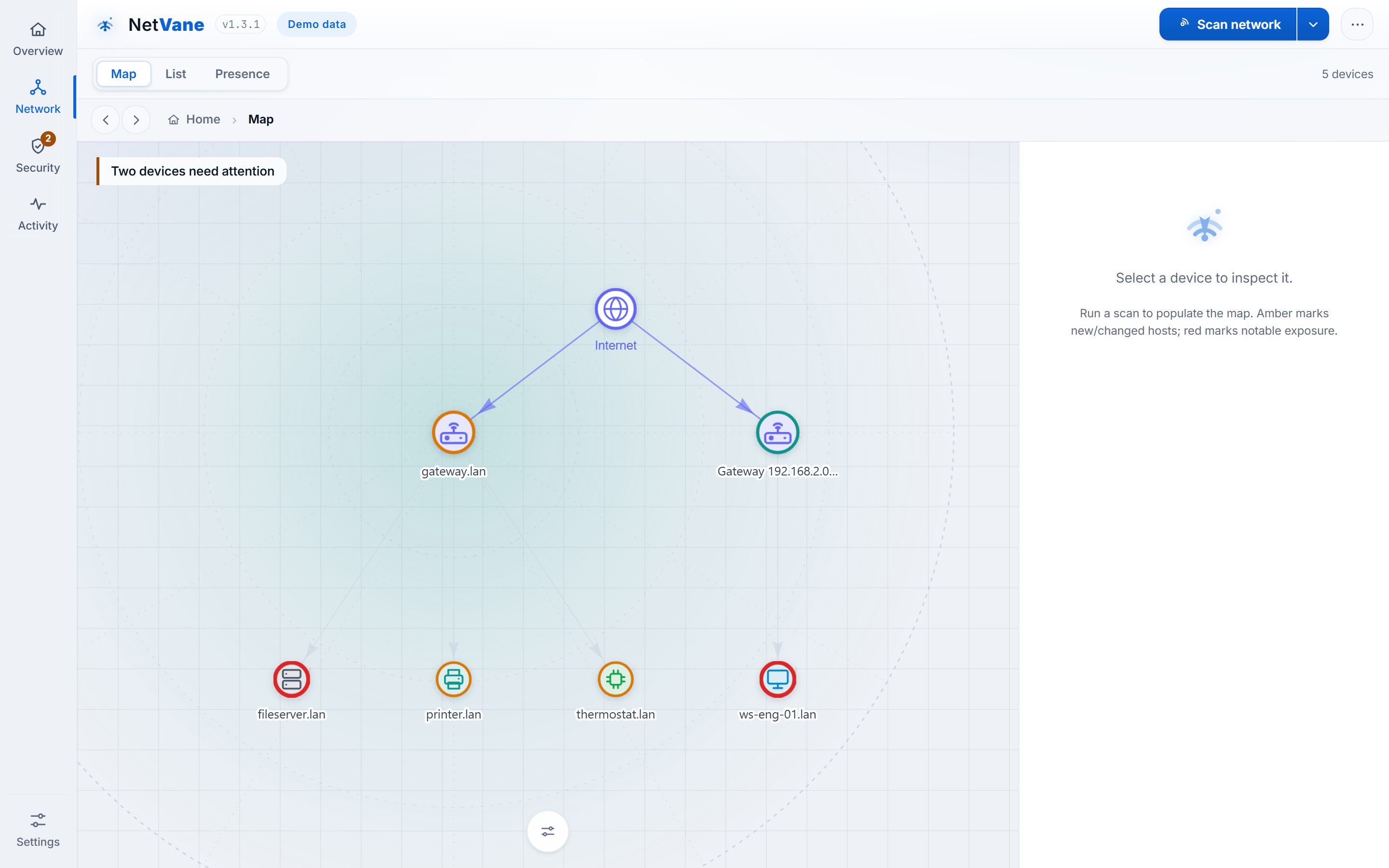
The Map view draws your LAN as an interactive graph, devices radiating out from the gateway, so you can see the shape of your network at a glance and spot anything that doesn't belong. It updates live as a scan discovers and identifies hosts.
- Colour-coded, per-type icons with a legend, and status rings that flag new, changed, or exposed hosts at a glance
- Drag to arrange your layout (NetVane remembers it) or group devices into rooms / zones, and flip the map top-down ↔ left-right
- Updates live as devices are found; click any node to open its full detail
- "Connected via" places a device under its switch or access point for a true physical hierarchy
Security insights & network utilities
Automatic device identification
A read-only SSDP/UPnP sweep during each scan learns every device's model, maker and type, and a built-in, over-the-air-updatable device-fingerprint table names the make and model of common home devices (“Ring doorbell”, “Sonos speaker”), matched entirely offline with the confidence shown. Recognizes Matter & Thread smart-home gear too. Sharper names and icons, discovered locally.
Known-CVE matching (offline)
Service versions matched against a bundled NVD / CISA-KEV database entirely on your machine, with known-exploited (KEV) issues first, then ranked by real-world exploit probability (EPSS), each showing the version to upgrade to and a plain-language "what it means & how to fix it".
Network behavior watch
Device behavior analytics: NetVane learns what's normal for your network and flags meaningful drift a scan alone misses: a sudden sustained upload spike (read from your router's own counters, all local) that can signal a device leaking data, a new internet port-forward, or a long-stable smart-home device that suddenly opens a port. Insight-only; tuned hard against false alarms.
Per-device flow analytics · opt-in
Take the behavior watch per device: point your router's NetFlow v5/v9, IPFIX or sFlow export at NetVane and it baselines which external destinations each device normally talks to, then flags a device that suddenly sends real volume to a brand-new destination, the classic signature of a hijacked device exfiltrating data. The collector is receive-only and accepts flow records only from the router IP you configure (a first-line filter against stray injection). Off by default.
"Is your smart home contained?"
A plain-language verdict on whether your cameras, speakers and plugs share a network with your computers and phones, naming the devices at risk, plus a step-by-step guide to setting up a guest/IoT network, with a link to your router brand's own setup page.
Router & gateway health
One consolidated check of your router: DNS trust (nothing hijacking your lookups), gateway identity (no ARP-spoofing sign), risky remote-admin services, and a firmware-currency reminder, all from what NetVane already sees, nothing new scanned.
DNS speed benchmark
Times your DNS resolver(s) against reputable public ones (Cloudflare, Google, Quad9) and ranks them, so you can tell whether a faster, trustworthy resolver is available. An explicit, opt-in check recorded in the Local-only ledger.
Internet-exposure report
Opt-in: asks your router's UPnP gateway which ports it forwards from the internet, plus your public IP. Talks only to your router, never out to the internet.
Local-only panel
A live, checkable count of the only outbound calls NetVane can make, "0 internet requests" while scanning, backed by a real egress ledger, not a promise.
Rogue-DHCP detection
One broadcast DHCP discovery flags when more than one server answers, a classic hijack sign. Read-only; it never takes a lease.
Wake-on-LAN & utilities
Wake a sleeping device with a magic packet, or open its web/admin page in a tab, right from the device drawer.
Presence: "Who's on your network"
A presence view grouping devices into here-now / recently-seen / away, with a presence timeline each and an "intermittent" tag for the ones that sleep and wake. Assign devices to a person and it also answers "who's home" at a glance, entirely local, with no account and nothing uploaded.
Activity: Timeline and Diary
The same history read two ways: the Timeline's raw change feed, and its Diary mode, grouped by day with each day led by a plain-language narration, so you can catch up on a week without reading individual port changes.
Weekly network digest
An opt-in weekly summary of what changed on your network, new and departed devices, exposures opened or resolved, and how your score moved. Written in plain language, generated locally, and shown in the dashboard.
Backup & restore
Download your entire history and settings as a single file, and restore it later from Settings → Data & backup. Your scan history, device labels, rooms and triage decisions survive a reinstall or a move to another PC.
Experimental (off by default)
IPv6 device discovery from the OS neighbour cache, and SNMP switch-topology for managed switches, both opt-in, read-only, and confined to your LAN. Turn Advanced mode on in Settings, then find them under the Advanced pane.
Transparent security score
A single number you can trust because you can see how it was built. No black box, no vendor-defined "risk level" you can't audit.
0–100, with a letter grade
NetVane scores your network from 0 to 100 and assigns a letter grade from A to F. Every deduction is shown with its exact point impact, so you always know why the number is what it is.
Points come off for high-risk exposures, for devices NetVane couldn't identify, and for unexpected new devices. The score is charted over time, and you're alerted when it drops.
- Transparent factors: each deduction lists its cause and point cost
- Drivers: high-risk exposures, unidentified devices, unexpected new devices
- Charted over time; an alert fires when the score falls
Exposure detection & remediation
NetVane flags reachable "notable" services by category, matches their detected versions against a bundled CVE database, and confirms which exposures are real. For each one it explains why it matters, the risk of ignoring it, and exactly how to fix it, then helps you do the work and confirm it's done.
Notable categories include cleartext protocols (Telnet, FTP), file shares (SMB), remote desktop (RDP, VNC), exposed databases, Docker APIs, SSH, printers, and admin panels, each flagged with a plain-English fix. See the full list in the specs.
The Fix panel does the work with you
Every exposure opens a Fix panel: why it matters, the risk of ignoring it, and step-by-step instructions. From there NetVane doesn't just present the problem. It helps you resolve it and prove it's resolved.
- Fix panel, why / risk / steps, with a copy-steps button
- Open admin page, a button that opens the device's own admin interface
- Verify (closed-loop), re-scan that one host on demand to confirm resolved vs still open
- Accept risk, consciously triage an exposure; excluded from the score, recorded with a note and date
- Acknowledge, mark a new device as expected
- Identify, opt-in deep identify via mDNS / NetBIOS to learn a device's name
Why it matters
  Remote Desktop is reachable from
  the LAN, a common target.

Risk if ignored
  Exposed credentials, lateral movement.

How to fix
  1. Disable RDP if unused
  2. Restrict to VPN / firewall
  3. Enforce strong auth (NLA)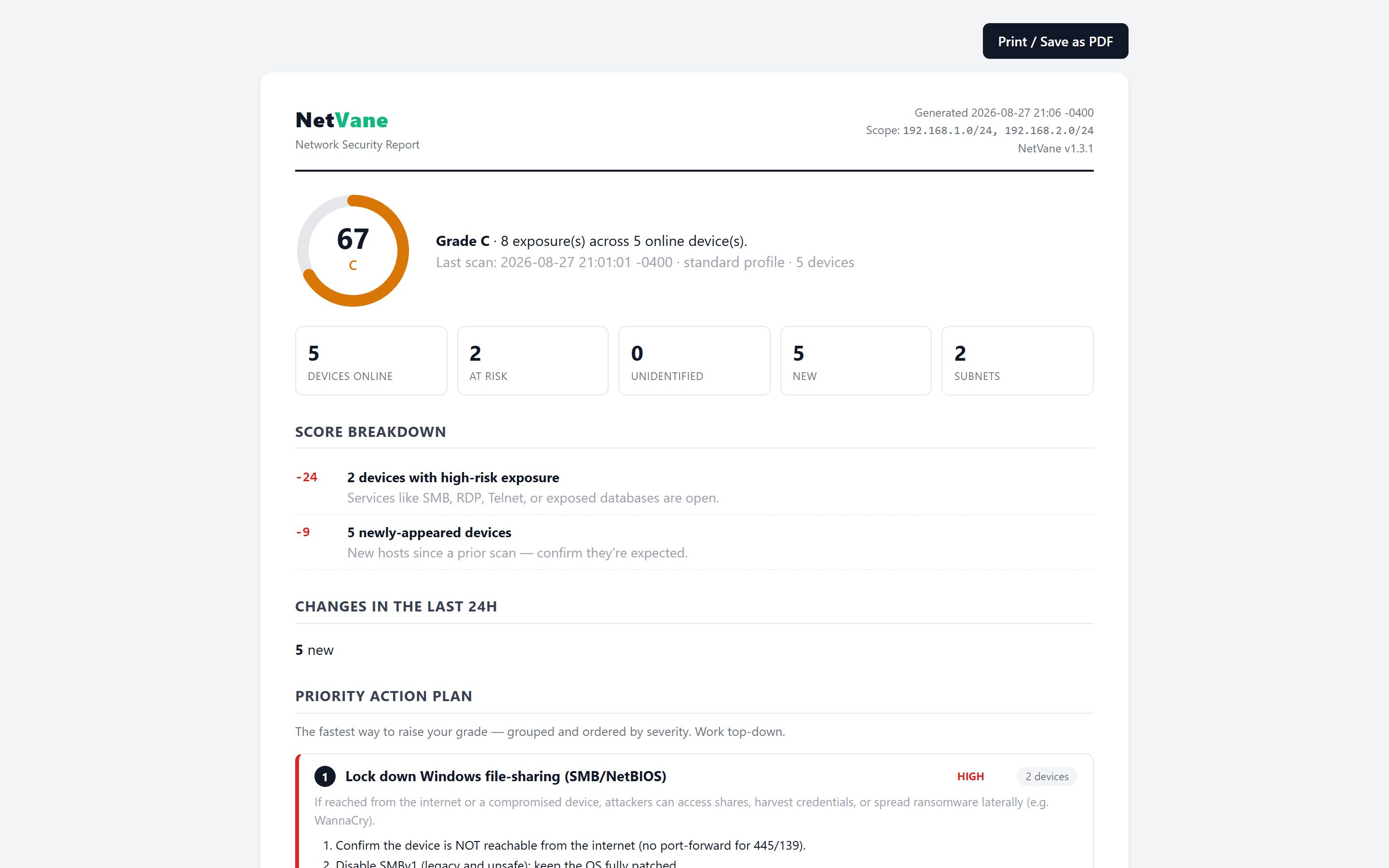
Priority action plan & security report
NetVane produces a self-contained, printable HTML security report, open it and choose Print → Save as PDF. It leads with a priority action plan: a ranked, de-duplicated to-do list grouped by fix, showing the devices and ports each item affects.
After the plan comes exposures by device, an accepted-risks ledger, the full score breakdown, and the complete device inventory. You can also export the inventory to CSV.
- Ranked, de-duplicated to-do list grouped by fix
- Each item lists the devices and ports it affects
- Exposures by device · accepted-risks ledger · score breakdown · full inventory
- Self-contained printable HTML report (Print → Save as PDF)
- CSV inventory export
Change tracking
Networks drift. NetVane records what changed, when, and how it moved your score, network-wide and per device.
Activity timeline
A running log of ports opened and closed, service / OS / hostname changes, and devices that appeared, returned, or went away.
Since last scan
A security delta: exposures opened or resolved, devices arrived or departed, and how the score moved since the previous scan.
Per-device timeline
Each device carries its own security timeline, so you can trace exactly how one machine's exposure evolved.
Score history & compare
A security-score history chart, plus the ability to compare any two scans side by side.
Change alerts
When something on the network changes, NetVane can tell you right away with a desktop notification. If you want changes pushed elsewhere, NetVane formats them for ntfy, Discord and Slack as well as raw JSON, so an alert reaches your phone without you writing anything to translate it.
- Desktop notifications for network changes
- Ready-made formats for ntfy, Discord and Slack, or raw JSON
- The webhook is one of only two kinds of outbound traffic that carry any data about your network (the other is a support report you send yourself), and only if you set it up
Unidentified host at 192.168.1.77 appeared during the last scan.
Structured search
The device list (Network → List) takes field terms you can combine, every term must match, alongside plain free-text. Filter to exactly the devices you care about.
Combine them freely, for example risk:high type:camera to show every high-risk camera. Add free-text to narrow further; all terms must match.
Per-device latency & health
The built-in engine measures TCP-connect latency (round-trip time) to each host, so every device carries a simple, live health reading alongside its inventory detail.
Scheduling
Turn on optional recurring scans at an interval you set in hours, and toggle scheduling on or off whenever you like. Set it and let NetVane keep watch.
Runs in the background
Opt in and NetVane keeps running in the system tray, scheduled scans continue and any change raises a native Windows notification. Off by default.
Guided onboarding & in-app help
A first-run guided tour walks newcomers through the essentials (replay it any time from Help). Help also links straight to the online documentation and produces a redacted, shareable diagnostics report for support, no device addresses, nothing sent anywhere automatically.
Navigation & UX
A fast, keyboard-friendly single-page dashboard. Four views, deep links that survive back/forward, and click-through from every number.
Fast and keyboard-driven
Four views (Overview, Network, Security, Activity) where Network carries the Map, List and Presence lenses and Activity holds Timeline and Scans & trends. A Ctrl-K command palette, keyboard shortcuts, click-through from every number, and shareable deep links that work with back/forward. Dark and light themes.
1–4 switch views · / search · s scan · t theme · ? help · Esc close
Trust & upkeep
The parts that decide whether a security tool is worth running for a year rather than an afternoon.
Signed, and checkable
The installer and the app are Authenticode-signed as GRCSAC, so Windows names the publisher. Updates are signed too and the app refuses any that does not verify, so a compromised download cannot become a compromised install.
Intelligence that stays fresh, or says it isn't
Vulnerability and device-fingerprint data refresh over the air, each download verified before use. If a refresh cannot be verified, NetVane keeps working with the data it already has and tells you it has stopped updating, rather than going quietly stale.
History for as long as you want it
You decide how long scan history is kept. Nothing is ever removed retroactively: a shorter window applies from the moment you set it and cannot reach back into history you already have.
Try all of it for 14 days
Every edition is unlocked for 14 days from first install, no account, no card, nothing to cancel. After that NetVane stays free forever for a single network, and expiry never removes your data or hides what it already found. See the editions.
Privacy & offline
Privacy isn't a setting in NetVane. It's the architecture.
netvane.db) on your machine. Only two kinds of outbound traffic carry any data about your network, and both need you to act: the optional change-alert webhook you configure, and a support report you send yourself from Report a problem, and each only if you choose to. Separately, NetVane can make four opt-in calls to netvane.doorvane.com, an app-update check, and CVE-intelligence, device-fingerprint or network-owner database updates (⋯ → Update intelligence), and none sends any data about your network; they only ask whether something newer is available.
Private distribution · direct download, no account · Installer NetVane-Setup-1.5.0.exe (recommended; per-user, no admin) or portable NetVane-Portable-1.5.0.exe for Windows 10 or 11.